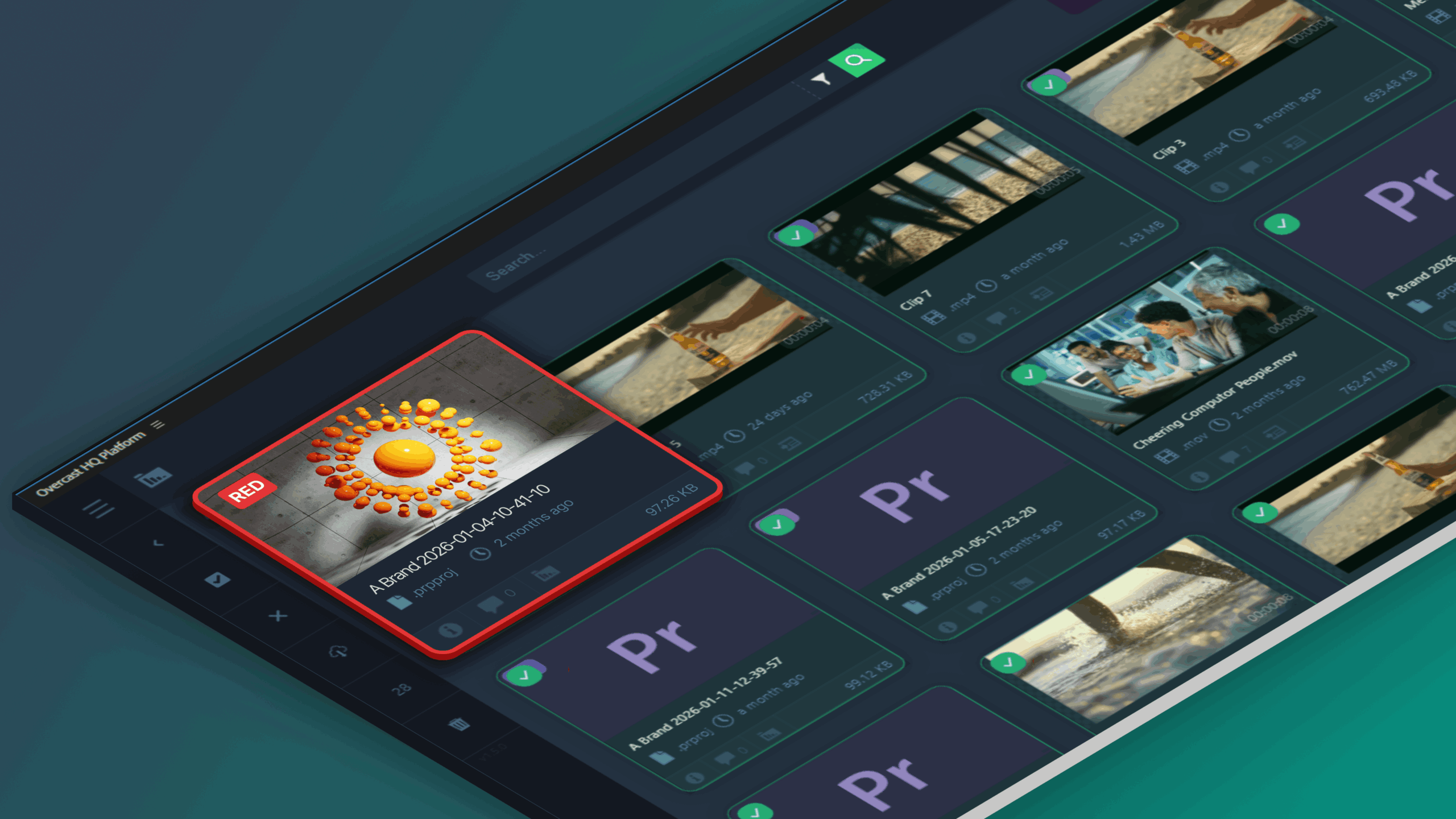
Our newest Premiere Pro Panel release transforms editing workflows; now with production sync, cloud rendering, centralised enterprise control and more…
Enterprise video production has changed permanently. It is no longer campaign-based. It’s continuous, distributed, regulated and revenue-impacting.
Marketing teams publish weekly. Product teams produce explainers at scale. Investor communications are increasingly video-led. Regional teams localise centrally produced assets. Compliance scrutiny tightens.
Video is now operational infrastructure, yet most enterprise editing workflows remain tool-based rather than system-based.
Editors work in Adobe Premiere Pro, media lives across cloud storage, attached drives and legacy servers. Projects move without structural control. Rendering blocks machines. Governance sits outside the edit.
This fragmentation is not a technical inconvenience. It is an operational risk. The new Overcast Premiere Pro Panel release marks a structural shift.
Embedding cloud-native creative operations infrastructure directly inside Adobe Premiere Pro, it connects editing workflows to centralised intelligence, scalable rendering and enterprise governance.
If you are evaluating how to scale video output without increasing operational risk, this release is worth exploring. You can request a strategic walkthrough of the new panel here.
The Structural Problem
In growing organisations, video complexity increases faster than systems evolve. Common symptoms include:
- Editors spending significant time searching for assets across disconnected storage environments
- Duplicate project files circulating without authoritative version control
- Local rendering tying up high-performance machines
- Large-format footage creating bandwidth and handling strain
- Hybrid cloud and on-prem storage operating in silos
- Compliance checks applied late in the production cycle
Individually, these issues appear manageable. Collectively, they reduce velocity, increase cost and introduce risk.
The cost of inaction compounds in three ways:
- Operational leakage through duplicated effort and rework
- Delayed campaign execution due to bottlenecks in rendering and approval
- Increased exposure to brand, licensing and regulatory missteps
Traditional Digital Asset Management systems address storage. Legacy Media Asset Management platforms address control, often at the cost of usability. Neither fully embeds operational intelligence into the edit environment itself.
That is the gap Overcast closes.
A New Creative Operations Infrastructure
This release is not simply an update to a Premiere Panel, it is a move towards Creative Operations Infrastructure.
Infrastructure means:
- Media intelligence embedded inside production tools
- Project governance integrated into collaboration workflows
- Rendering scaled beyond local hardware
- Hybrid storage unified under a searchable layer
- Compliance built into daily execution
In enterprise environments, infrastructure reduces dependency on informal processes. It creates predictable, scalable systems.
Overcast now delivers that inside Adobe Premiere Pro.
What’s New in the Overcast Premiere Pro Release
This release expands the panel from media access layer to operational backbone.
1) Adobe Project and Production Sync with Intelligent Versioning
Enterprise editorial teams frequently operate within Adobe Projects and Adobe Productions environments. As teams scale, project control becomes fragile.
The new release introduces:
- Full Adobe Project integration
- Adobe Productions support
- Intelligent synchronisation across teams and locations
- Built-in version tracking
- Legacy project indexing and support
Version confusion is replaced with visible governance. Project continuity is maintained across distributed teams.
The business impact is measurable:
- Reduced rework
- Lower risk of publishing incorrect versions
- Faster approval cycles
- Greater executive confidence in content accuracy
Version control becomes systemic rather than procedural.
2) Cloud Rendering via Adobe Media Encoder
Rendering is often the silent constraint in enterprise production.
Local encoding:
- Ties up machines
- Delays editors
- Requires hardware investment
- Creates unpredictable delivery timelines
With this release, Overcast integrates Adobe Media Encoder into the cloud.
Teams can:
- Queue multiple sequences simultaneously
- Apply custom export presets
- Use bespoke encoding configurations
- Monitor encoding status in real time
- View intelligent queue distribution
Editors continue editing while exports process remotely.
For leadership, this translates into:
- Increased production throughput
- Reduced capital expenditure on rendering infrastructure
- Predictable export timelines
- Improved time-to-market for campaigns
Rendering shifts from bottleneck to scalable capacity.
3) Structured Multi-Asset and Project Download
Enterprise projects are complex ecosystems of linked assets.
When moving between environments, structural breakdown creates delay.
The new panel supports:
- Multi-asset selection
- Entire project and folder download
- Preservation of original hierarchy
This ensures structural integrity across cloud and local environments.
The benefit is not convenience. It is operational continuity.
Distributed teams collaborate without reconstruction overhead.
Production timelines remain intact.
4) Intelligent RED File Workflows
High-resolution RED footage is powerful but can sometimes be resource-intensive.
The updated panel introduces:
- Smart RED previewing
- Selective collection downloads
- Streamlined import handling
Editors retrieve only what is required. Bandwidth usage decreases. Workflow efficiency improves without compromising production standards.
For broadcast and high-end enterprise production environments, this reduces performance drag while maintaining quality.
5) Attached Storage and Hybrid Infrastructure Support
Enterprise environments rarely operate entirely in the cloud.
Hybrid infrastructure is now the norm.
The new release enables:
- Attached storage indexing
- Unified search across cloud and on-prem systems
- Centralised governance across environments
This reduces fragmentation without requiring immediate infrastructure overhaul.
Cloud-native does not mean cloud-exclusive. It means architected for integration.
Intelligent Media Access Inside Premiere Pro
The Overcast Premiere Pro Panel ensures that enterprise media is always within reach, directly inside the editing environment.
With advanced AI-powered search in Overcast itself, the panel provides direct navigation into projects, folders, and curated collections. Editors can quickly locate and retrieve content surfaced by Overcast without leaving Premiere Pro, reducing interruptions and eliminating manual file transfers.
In practice, this enables enterprise teams to:
- Access the right content faster, avoiding time lost hunting across storage systems.
- Reduce duplication, ensuring all editors work from a single source of truth.
- Accelerate campaign assembly, leveraging centralised collections for rapid sequence creation.
- Unlock archive value, turning historical production assets into actionable resources.
By connecting the editorial workspace to Overcast’s centralised media ecosystem, the panel transforms archives from passive storage into active contributors to creative output. Editors operate with clarity and confidence, while operations teams gain insight into content usage across projects and teams.
This seamless bridge between Overcast’s intelligence and Premiere Pro navigation boosts workflow efficiency and reinforces enterprise control.
Governance Embedded in Workflows
As enterprise video output increases, so does scrutiny.
Brand guidelines evolve. Licensing agreements expire. Regional compliance rules differ. Internal approval processes become more complex.
When governance sits outside the editing workflow, it becomes reactive. Content is reviewed late. Errors are identified after distribution plans are in motion. Teams operate in uncertainty.
The Overcast Premiere Pro Panel integrates governance into the act of creation.
Permissions are structured around role-based access, ensuring that sensitive or region-specific material is visible only to authorised teams. Secure sharing controls manage how assets move beyond the organisation. Comprehensive audit logs record who accessed, modified or distributed content.
This is not about control for its own sake. It is about predictability.
When governance is systemic:
- Approval cycles become faster because version history is clear
- Legal and compliance teams gain visibility without obstructing production
- Brand teams can enforce consistency across regions
- Leadership can demonstrate oversight in regulated industries
Creative speed and operational control are often framed as trade-offs. Properly designed infrastructure removes that tension. Governance becomes part of the workflow rather than an interruption to it.
Who Is This Built For?
The Overcast Premiere Pro Panel is designed for organisations where video is structurally important, not experimental.
For creative teams, the value is immediate and tangible. Editors gain faster access to centralised media, confidence in version integrity and the ability to render without blocking their machines. The system supports creativity by removing operational drag.
For media operations leaders, the value is systemic. Workflows become centralised. Storage environments become unified. Compliance oversight becomes embedded. Reporting and auditability improve. Scaling output does not require scaling chaos.
For CTOs and technology leaders, the value lies in architecture. The platform is cloud-native, integrates with hybrid storage and reduces dependence on fragmented tooling. Infrastructure decisions align with long-term scalability rather than short-term patching.
For CMOs, the value is strategic. Campaign velocity improves. Brand risk declines. Content investment yields greater return. Distributed teams operate within a controlled system rather than a collection of workarounds.
Again, this is not a passive digital asset library. It is not a complex, IT-heavy MAM deployment.
It is creative operations infrastructure, designed to sit where work actually happens.
The Big Impact
When creative workflows are structurally aligned with enterprise systems, the effects extend beyond production efficiency. Campaign cycle times reduce because discovery, version control and rendering no longer introduce delay. Faster time to market directly influences revenue momentum in competitive sectors.
Rendering scalability reduces the need for continuous hardware expansion. Infrastructure spend becomes more predictable and more efficient. Version-related errors decline, reducing the risk of publishing incorrect messaging or outdated assets. Brand integrity strengthens.
Archives become active assets rather than sunk cost. Historical production investment delivers measurable ongoing value. Compliance risk decreases because governance is embedded in daily operations, not applied retroactively.
Cross-regional collaboration becomes structured rather than improvised, enabling global brands to operate with local agility and central control.
Friction does not disappear entirely. But it becomes manageable, visible and engineered against. Momentum replaces improvisation.
Move From Fragmented Editing to Connected Creative Operations
Enterprise video production will continue to scale, the question is whether the systems supporting it will scale with it.
If you are ready to transition from fragmented editing workflows to connected creative operations infrastructure, request a strategic demonstration of the all-new Overcast Premiere Pro Panel.
See how project sync, cloud rendering and hybrid storage integration work inside your existing environment.
Clarity. Control. Confidence. Built directly into Premiere Pro.
Frequently Asked Questions
What is new in the latest Overcast Premiere Pro Panel release?
The latest release introduces Adobe Project and Productions synchronisation, cloud rendering via Adobe Media Encoder, structured multi-asset downloads, RED workflow support and attached storage integration.
How does Overcast improve enterprise video workflow management?
It centralises media intelligence, synchronises projects, scales rendering, supports hybrid storage and embeds governance directly within Premiere Pro, reducing friction and risk.
Does the panel support Adobe Productions?
Yes. Adobe Productions environments are supported with intelligent sync and version tracking.
Can existing Premiere Pro projects be integrated?
Yes. Legacy projects can be indexed, synchronised and governed within Overcast.
How does cloud rendering reduce infrastructure cost?
By shifting encoding workloads to scalable cloud environments, organisations reduce dependency on local hardware expansion and improve utilisation efficiency.
Is Overcast suitable for hybrid storage environments?
Yes. Attached storage and on-prem systems can be indexed and searched alongside cloud assets.